

























































Power BI data modelling is one of those topics that comes up again and again in analytics conversations — and for good reason.
Get it right, and you unlock a faster, more scalable, more human-friendly reporting environment.
Get it wrong, and you end up buried in complex DAX formulas that only one person in the business can decipher.
This post explores what data modelling actually means inside Power BI, how the long-established Kimball Methodology applies to it, and — most importantly — whether the extra upfront effort is genuinely worth it.
Spoiler: it almost always is.
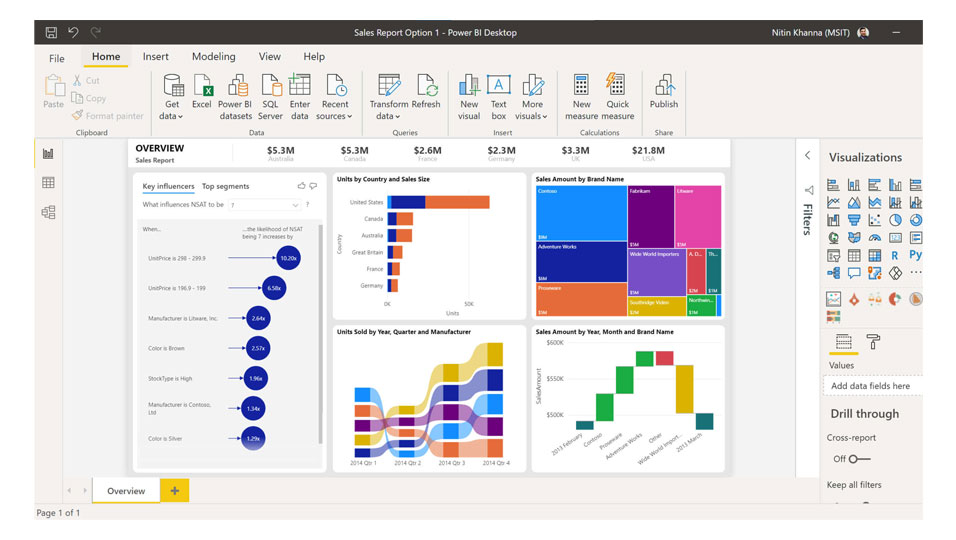
What Is Power BI Data Modelling?
A recent conversation on Power BI touched on a question that more teams should ask themselves: why would you model data for a wider business need than the report you happen to be building right now?
What are the trade-offs, and does one approach clearly outweigh the other?
In true analytics terms, data modelling is also known as dimensional modelling — but for the purposes of this post, we’ll stick with “data modelling” throughout.
Power BI has a phenomenal capability when it comes to transforming data, which places it rightly at the top spot for analytics toolsets according to organisations such as Gartner.
Look back 15 years or so, and that same transformational capability would have required an intensively technical process — a longer project design phase, a larger development team, and significant infrastructure investment.
Whilst there are still many occasions where a fully-fledged data warehouse is the right answer, the transformational capability of Power BI moves the goalposts considerably. This is especially true for organisations that aren’t ready — or willing — to commit to a full data warehouse project.
In the simplest of terms, data modelling is the art of transforming data to enable an easier process of gaining insight from your analytics.
Think of it like building a well-organised library versus a warehouse full of unsorted boxes. Both contain the same information, but one lets you find what you need in seconds; the other costs you hours of searching every time.
Transactional Databases vs Analytical Data Structures
When we think of a database sitting behind a business application — an ERP, a CRM, a retail platform — we see a complex schema designed for discrete reads and updates of small pieces of information. That structure is perfectly suited to the day-to-day running of the system.
But when it comes to gaining insight from that data — spotting trends over time, comparing performance across regions, understanding customer behaviour — the volume of data being read for a single query is vastly larger. You’re reading more rows, and you’re reading wider across the database schema.
These are fundamentally different data needs. You couldn’t realistically rely on one structure to serve both purposes well. Data modelling bridges that gap: it makes the process of producing analytics far more efficient, both technically and from a human understanding perspective.
When you model the data for more efficient reporting, you are also making it easier for non-technical people to interact with it. Data modelling is, therefore, the art of making data make more sense.
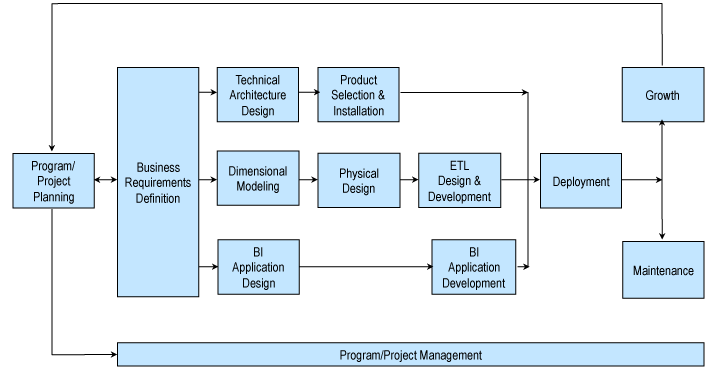
The Kimball Methodology and Dimensional Modelling in Power BI
Any honest discussion of Power BI data modelling would be incomplete without mentioning the Kimball Methodology.
Developed by Ralph Kimball and widely adopted across the data warehousing industry, it frames data modelling in terms of Fact tables and Dimension tables — hence the phrase “dimensional modelling.”
Here’s how it works in practice:
- A central Fact table describes an event that has taken place — for example, a retailer completing a sale.
- Surrounding Dimension tables describe the context of that event: when it happened, what was sold, who bought it, which store it occurred in.
- Arranged diagrammatically, these tables form a star — which is why this structure is commonly called a star schema.
There is considerably more to the methodology than that overview suggests, but the star schema is its most immediately applicable principle inside Power BI.
Why the Star Schema Scales So Well
One of the most powerful aspects of the Kimball approach is that you can add more Fact tables as your reporting needs grow, with each new Fact table referencing Dimensions that are often shared with existing ones.
Using the retail example: you might have a Product Dimension table that joins with both a Sales Fact table and a Stock Fact table. That single shared Dimension means you can compare sales performance against stock levels without duplicating data or creating new transformation logic.
New reporting requirements slot into the model naturally, rather than requiring a rebuild from scratch.
Why Model Data for a Wider Business Need Than the Current Report?
This is the core question — and the one most likely to spark debate inside a development team under time pressure.
The argument against modelling broadly usually comes down to urgency: “We just need this one report by Friday.” That’s understandable. But it consistently creates a larger problem downstream.
There are clear, compounding benefits to modelling data for a broader business need from the outset:
- Whilst the design and first phase of development may take slightly longer, subsequent data modelling exercises are quicker because Dimension tables are already in place from earlier phases.
- There is a strong chance that the current model will support future reporting needs, even those that haven’t been formally planned yet.
- Non-technical users can more easily understand a well-structured semantic model, which reduces the dependence on technically skilled staff as a bottleneck for report development.
- DAX calculations in Power BI reports become considerably simpler — and therefore easier for others to read, maintain, and build upon.
- Report interactions are noticeably more efficient: the DAX running with every visual interaction executes much more quickly when the heavy lifting has already been done at model refresh time.
That last point is frequently overlooked during development. The goal of analytics tools is to make insight more accessible — not to showcase the most impressive DAX formula.
Modelling the data correctly moves complexity away from the end user and towards the data engineer, where it belongs.
The Pros of Power BI Data Modelling
The benefits of investing in a properly structured semantic model in Power BI are substantial and, crucially, compound over time:
- Broader self-service capability. Data modelled for human understanding enables more people to build their own reports and explore data without specialist support. This directly reduces the burden on analytics teams and accelerates time-to-insight across the business.
- One semantic model, multiple reporting needs. A well-built model can satisfy a wide range of reporting requirements, making it far more reusable and delivering a greater return on the development investment compared to one-off, report-specific data preparation.
- Faster report interactions. By shifting computational effort from run-time DAX to the scheduled model refresh — typically overnight — report visuals respond more quickly. End users experience a snappier, more responsive dashboard.
- Easier maintenance. Reports built on a clean dimensional model are significantly easier to maintain. You spend less time reverse-engineering complex DAX written by a previous developer, and more time delivering value.
- Reduced data proliferation in the Power BI Service. Without deliberate modelling, organisations tend to accumulate multiple variations of the same data in the Power BI Service — which can push licensing costs upward and create version-control headaches. Microsoft Fabric’s flavour of Power BI mitigates this further by retaining only a single version of the data regardless of how many semantic models reference it.
The Cons of Power BI Data Modelling — and Why They’re Manageable
The case against dimensional modelling in Power BI is not without merit. But it is worth examining each objection carefully, because most of them weaken significantly under scrutiny.
- Longer initial design and development. Producing a well-structured semantic model does require more thought upfront. However, this cost is front-loaded: later development phases benefit directly from Dimension tables that already exist, often making subsequent phases faster than they would have been under an ad hoc approach.
- Slightly higher storage footprint. Modelled data can occupy more space than raw transactional tables. In practice, this is offset by two factors: shared Dimension tables eliminate the repetitive storage of descriptive data, and Power BI’s columnar storage engine strips out duplicate values automatically — unlike traditional row-based database storage.
- More learning resources exist for DAX workarounds. It is true that the internet offers more guidance on using DAX to solve data problems than on solving those same problems through better data modelling. This reflects adoption patterns, not best practice. Once the principles of dimensional modelling are internalised, many of the DAX gymnastics that developers reach for become unnecessary — and the resulting reports are more maintainable for it.
Data Modelling in Power BI vs a Full Data Warehouse: When to Use Which
It is worth being clear that Power BI data modelling and a traditional data warehouse are not always interchangeable.
For organisations handling very large data volumes, complex multi-system integration, or strict data governance requirements, a dedicated data warehouse — built on platforms such as Azure Synapse, Snowflake, or SQL Server — remains the right foundation.
Power BI’s transformation capabilities — particularly within Power Query — have lowered the barrier to entry for dimensional modelling considerably. For organisations that need structured, scalable analytics without the overhead of a full warehouse project, modelling directly within Power BI is a pragmatic and increasingly powerful option.
Microsoft Fabric is shifting this landscape further still, offering a unified analytics platform where data preparation, modelling, and reporting converge — with a single copy of the data underpinning all of it.
Practical Steps to Improve Your Power BI Data Modelling
If you are looking to move towards better data modelling practices within Power BI, a few foundational habits make a significant difference:
- Start with the star schema. Identify your Fact tables first — the measurable business events — then build Dimension tables around them. Resist the temptation to start with raw source tables and work outwards.
- Name your tables and columns clearly. A Dimension table called Dim_Customer and a Fact table called Fact_Sales is immediately legible to any developer. Cryptic system field names inherited from source databases should be renamed during transformation.
- Keep DAX simple as a design goal. If a DAX measure is becoming difficult to read, ask whether a modelling change could resolve the underlying issue. In many cases, it can.
- Build with reuse in mind. Before creating a new Dimension, check whether a similar one already exists in the model. Shared Dimensions are a feature, not an overhead.
- Document the model. Even a brief description of what each table represents saves considerable time for the next developer — or for yourself six months later.
Summary: Should You Model Your Power BI Data?
When weighing up the pros and cons of Power BI data modelling, the case for a structured, dimensional approach is compelling.
The initial investment in design and development is real, but it is consistently outweighed by the long-term gains: faster reports, broader self-service adoption, simpler DAX, and a model that grows with your business rather than constraining it.
Whilst the Kimball Methodology contains more complex principles than you would necessarily implement in full within Power BI, its core tenet — get the data structure right — is one that should become standard practice. Analytics tools are only as good as the data structures underpinning them.
Whether you are building your first Power BI report or reviewing an established estate of dashboards, investing in data modelling fundamentals is one of the highest-return decisions an analytics team can make.
Written by Mike Hobson, Pre-Sales Consultant, Codestone.
Contact enquiries@codestone.com to speak with our analytics experts.
Frequently Asked Questions About Power BI Data Modelling
What is data modelling in Power BI?
Data modelling in Power BI is the process of structuring and transforming raw data into a format optimised for reporting and analysis. This typically involves creating Fact tables and Dimension tables arranged in a star schema.
A well-built data model makes reports faster, DAX calculations simpler, and the data easier for non-technical users to explore.
What is the Kimball Methodology and does it apply to Power BI?
The Kimball Methodology is a widely adopted framework for dimensional modelling, developed by Ralph Kimball. It organises data into Fact and Dimension tables in a star schema structure.
Whilst the full methodology includes advanced concepts designed for enterprise data warehouses, its core principles are highly applicable to Power BI and form the basis of best-practice data modelling within the tool.
Is it better to use DAX calculations or data modelling to solve reporting problems in Power BI?
Both have their place, but the general principle is: solve problems at the model level where possible, and reserve DAX for calculations that genuinely require it.
A well-structured dimensional model reduces the need for complex DAX, making reports faster to build, easier to maintain, and more accessible to non-technical report developers.
Do I need a data warehouse if I use Power BI data modelling?
Not necessarily. Power BI’s transformation capabilities allow organisations to apply dimensional modelling directly within the tool. For smaller organisations or those with more straightforward data needs, this can be a practical and cost-effective approach.
However, organisations with very large data volumes or strict governance requirements will often benefit from a dedicated data warehouse as a foundation.
How does Microsoft Fabric affect Power BI data modelling?
Microsoft Fabric introduces a unified analytics platform that brings data preparation, modelling, and reporting together.
One of its key benefits is that it retains only a single copy of data regardless of how many semantic models reference it — reducing storage duplication, simplifying governance, and helping manage Power BI licensing costs.
We should be talking.
It will be worth it.
Or let’s talk about how we can help you now.